
In the ever-evolving world of gaming, having the right PC can make all the difference. Whether you’re a casual gamer or a competitive esports player, building your own gaming PC allows you to tailor performance to your specific needs. This guide will walk you through the essential components and considerations for creating a powerful gaming rig that meets your expectations.
Understanding the Basics of Gaming PCs
Before diving into specific components, it’s important to understand what makes a gaming PC different from a standard computer. Gaming PCs are built with high-performance hardware that can handle demanding graphics and processing tasks. They typically feature powerful graphics cards, high-speed processors, ample RAM, and efficient cooling systems to ensure optimal performance during intense gaming sessions.
When considering a gaming PC, one of the first things to think about is your budget. Gaming PCs can range from entry-level models to high-end machines costing several thousand dollars. Setting a budget will help narrow down your choices and ensure you get the best performance for your money.
Additionally, understanding the purpose of your gaming PC is crucial. Are you planning to play the latest AAA titles, or are you more interested in indie games? Your intended use will influence the components you choose.
Choosing the Right Components
Now that you have a basic understanding of gaming PCs, it’s time to select the right components for your build. The main parts you’ll need to consider include the CPU, GPU, RAM, storage, motherboard, power supply, and case.
The CPU (Central Processing Unit) is often referred to as the brain of your PC. A powerful CPU is essential for overall performance, especially in CPU-intensive games. Popular choices among gamers include Intel’s Core i5 and i7 series and AMD’s Ryzen 5 and 7 series.
The GPU (Graphics Processing Unit) is arguably the most critical component for gaming performance. A good GPU will allow you to enjoy high frame rates and stunning graphics. Brands like NVIDIA and AMD dominate this space, with models like the NVIDIA GeForce RTX 3060 and AMD Radeon RX 6700 XT being popular among gamers.
Building vs. Buying Pre-built
One of the key decisions you’ll face is whether to build your gaming PC from scratch or purchase a pre-built system. Each option has its advantages and disadvantages. Building your own PC allows for greater customization and often provides better value for money. You can choose each component based on your needs, ensuring compatibility and performance.
On the other hand, pre-built gaming PCs offer convenience and immediate access to a fully functional system. They often come with warranties and technical support, which can be appealing for those who may not feel comfortable assembling a PC themselves.
If you decide to go the DIY route, there are many resources available online to guide you through the building process. Websites like gaming PC builder provide useful tools for ensuring compatibility and tracking prices.
Cooling Solutions and Aesthetics
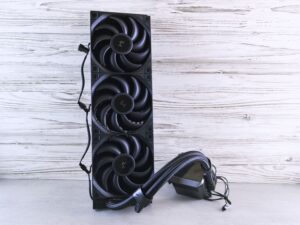
Cooling is a vital aspect of any gaming PC build. High-performance components generate a significant amount of heat, and effective cooling solutions are essential for maintaining optimal performance and longevity. You can choose from air cooling, which is generally more affordable and easier to install, or liquid cooling, which can offer superior performance for high-end builds.
In addition to performance, many gamers consider aesthetics when building their PCs. RGB lighting, custom cases, and themed builds have become popular trends. While aesthetics won’t impact performance, creating a visually appealing setup can enhance your overall gaming experience.
Furthermore, cable management is another aspect that contributes to the overall look of your build. Keeping your cables organized not only improves airflow but also makes your setup more visually appealing.
Finalizing Your Build and Testing
Once you’ve selected all your components and assembled your gaming PC, the next step is to install an operating system and any necessary drivers. Most gamers opt for Windows due to its compatibility with a wide range of games and software.
After installation, it’s essential to perform thorough testing to ensure everything is functioning correctly. Benchmarking software can help you gauge the performance of your new build and identify any potential issues.
Finally, don’t forget to regularly maintain your gaming PC. This includes cleaning dust from components, monitoring temperatures, and updating drivers to ensure optimal performance over time.
Conclusion
Building a gaming PC is a rewarding experience that allows you to create a machine tailored to your gaming needs. By understanding the essential components, making informed choices, and taking the time to build and test your system, you can enjoy an immersive gaming experience that meets your expectations. Whether you choose to build from scratch or buy a pre-built system, the world of gaming awaits you with endless possibilities.